Trade
The token page and ticket: Buy, Sell, Limit, quotes, slippage, price impact, confirmations and status.
/trade is search-first: type a name or paste an address. A token page is /trade/<chain>/<address>; the chain in the URL is the chain the trade settles on.
Layout
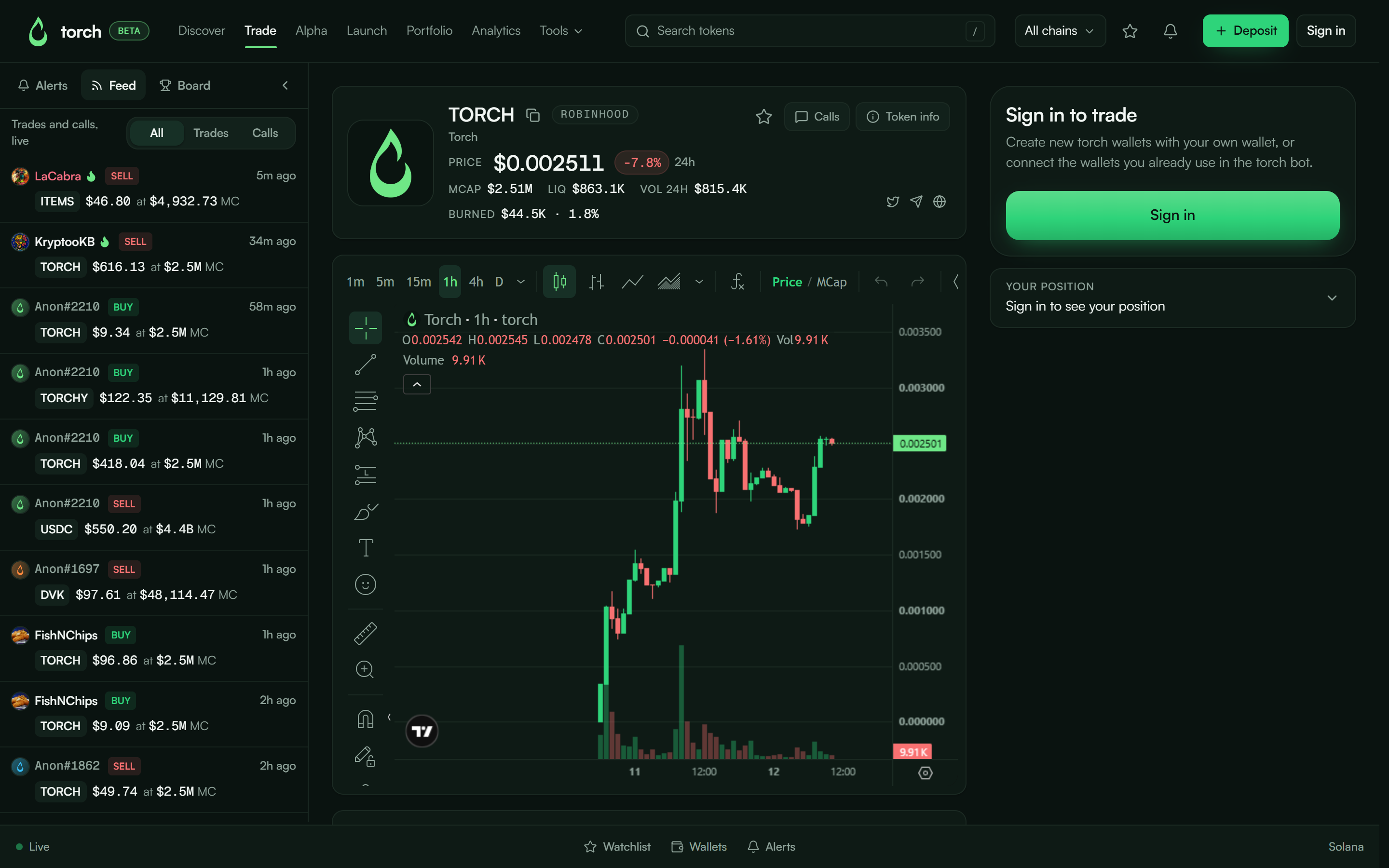
From left to right: the live feed of trades and calls, the token header and chart in the middle, and the trade ticket and your position on the right.
- Chart: switch between Price and MCap (market cap) with the toggle on the chart. Candles come from market-data providers; for very new tokens a chart can be unavailable, and the reason is shown.
- If a coin just moved to a pool the chart provider doesn't cover yet, the chart says its history has ended and the header price is the live one.
- Copy CA: the copy button next to the ticker copies the token's contract address.
- Token info: links, holders and, for Torch launchpad tokens, Launch details (creator, preset, buy tax, where the tax goes and how much has been paid out, burned and claimed).
- Calls: posts from Torch traders about this token.
Buy
- Type an amount or tap a Quick preset (the same presets as the bot).
- Quote line: You get ≈ …, refreshed live; max slippage chip to adjust.
- Fee line: Fee 1% · min …. The Torch fee is always shown before you act.
- Button text tells you what happens next: Buy TOKEN signs automatically; Buy TOKEN · password means it is above your threshold.
Sell
- Amount or Portion presets (25 / 50 / 75 / 100%).
- You hold … comes from a live read. If the read fails you see Balance could not be read, this is not zero. rather than a misleading 0.
Price impact
This size moves the price about 4%.
Warnings start around 3%. Large impact blocks the button until you explicitly choose Buy anyway · X% impact. This protects you from thin pools; it is not a fee.
Limit tab
Buy when price drops / Sell when price hits. Creates a take profit, stop loss or limit buy that the execution layer watches for you. Details on Orders.
Lifecycle and status
| Button / status | Meaning |
|---|---|
| Enter an amount | Nothing valid to send |
| Sending… | Building and signing |
| Sent · confirming | Broadcast; waiting for the chain |
| Bought TOKEN / Sold TOKEN | Confirmed on-chain; View opens the explorer |
| Try again | Failed; a one-line reason is shown above |
Torch shows Sent at broadcast and Confirmed when the chain includes the transaction. Nothing is marked done on a guess.
Signed out
The ticket reads Sign in to trade. Same Telegram account and wallet as the Torch bot. Quotes still work so you can browse.
Routing, fee and custody
Same as the bot: quotes from several aggregators and DEX routers, best executable route wins, flat 1% fee, automatic signing under your threshold. See Fees and Security & custody.